
RouteHound: The Region-Day Route Planner We Built for Our Own Field Team
A self-hosted route planner that turns your CRM into focused, drivable region-days — own your data, skip the per-seat fee, keep every CRM write reversible.
Anyone whose job is visiting customers in person knows the small tax that gets paid before the first handshake of the day: figuring out where to go. You open the CRM, scroll a list of prospects scattered across a couple of counties, squint at a map, and try to stitch together a day that doesn’t have you crossing the same highway four times. It’s fifteen minutes of planning that rarely produces a good answer — and you pay it again every morning.
We had exactly this problem with our own outside-sales work, so we built a tool to fix it. We call it RouteHound. It pulls prospects out of our CRM, geocodes them, and plans a sane, drivable day of visits — and it runs entirely on our own hardware, so the prospect list and the routing never leave our network and there’s no per-seat subscription quietly billing us for every rep.
One honest note before we go further, because we’d rather under-claim than oversell: RouteHound’s routing is optimization, not an LLM. The part that orders your stops and measures drive time is math — open-source routing engines and a solver, the same class of technology behind the navigation app on your phone. There is AI in this story, but it lives somewhere specific — in the briefing that waits for the rep at each stop — and we’ll be precise about that when we get there.
This is what we mean when we call ourselves a Managed Intelligence Provider: practical automation that sits on top of dependable systems and hands a rep their morning back — the fifteen minutes that used to vanish into a map — without pretending every piece of it is magic. We built RouteHound for ourselves first — the only honest way to recommend a thing — and the same approach now works for any business that sends people into the field.
The defining idea: plan a region-day, not one perfect route
When most people first think about route optimization, the instinct is to ask for the optimal route — one mega-loop that touches every prospect in the database with the least possible driving. It sounds efficient. In practice it’s close to useless, because nobody visits two hundred prospects in a day. A single “optimal” route across your whole list mostly tells you that prospect 147 is theoretically three minutes closer if you hit it before prospect 148 — a decision no human needed help making.
Field reps don’t think in mega-routes. They think in days, and they think geographically: “I’m going to be up around Gainesville today — who else is up there worth a stop?” That’s the real planning unit, and it’s the one RouteHound is built around.
So instead of solving for one giant loop, RouteHound plans a region-day. You drop a center — a town, a ZIP code, a point on the map — and set a radius around it. The tool gathers every prospect inside that circle, then builds the best same-day loop through them, starting and ending at the office. Tomorrow you pick a different center, and over a week the whole territory gets covered in focused, geographically coherent days that barely overlap. Yes, planning one circle at a time instead of the whole map at once gives up a sliver of theoretical global-optimal mileage. What it buys back is worth far more: a day with less backtracking, a clear mental model of where you are, and — the part that actually matters — a plan a human will follow instead of override. The most optimal route in the world is worthless if the rep looks at it, decides it’s nonsense, and free-styles the day anyway.
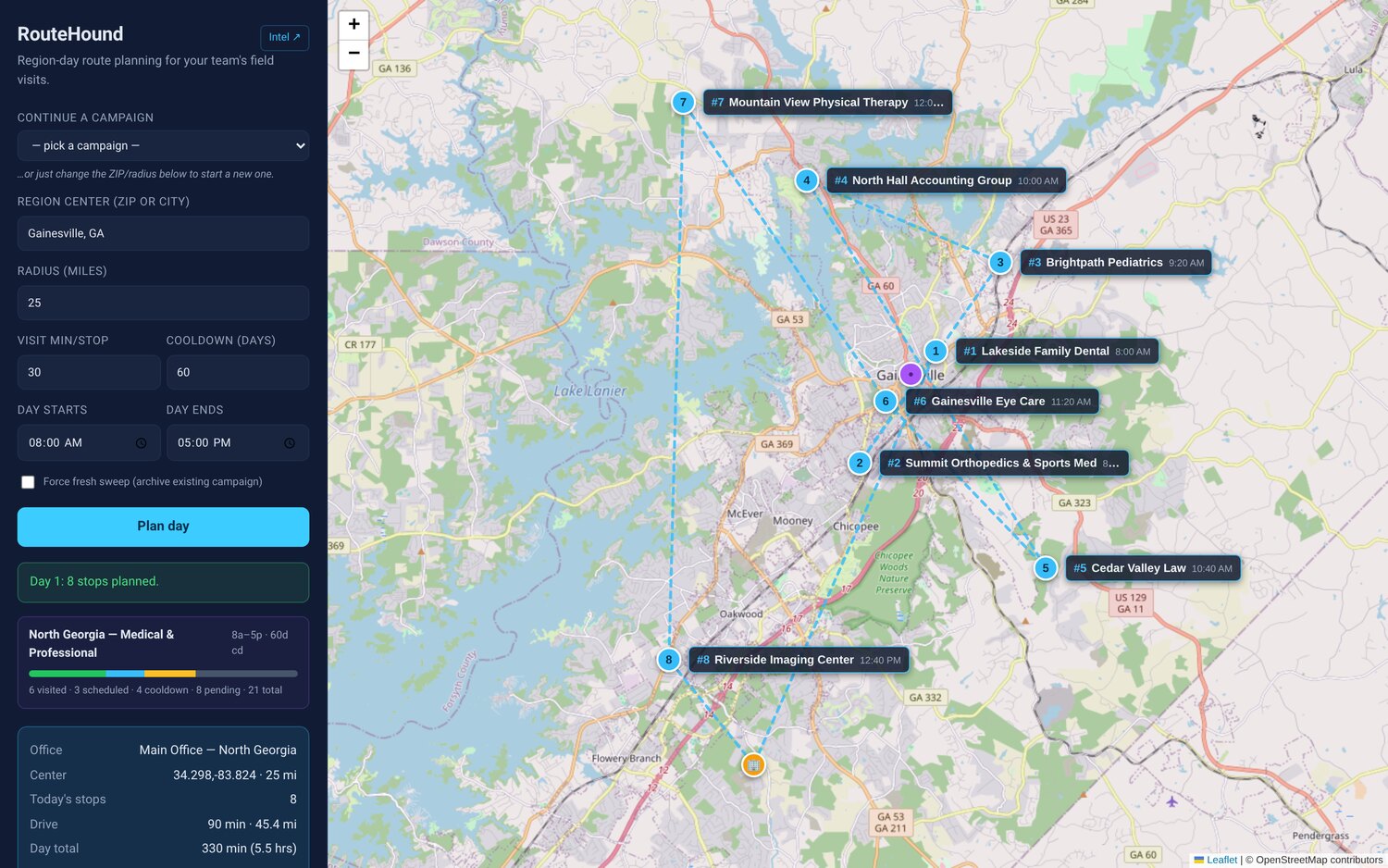
The screen above is a real region-day: the office anchored at one point, the region center and its radius drawn on the map, and an eight-stop loop threaded through the prospects inside it, with the day’s total drive time and distance called out. It reads the way a rep already pictures their territory — one coherent chunk at a time.
A day only holds so many hours
This is where a map toy becomes an actual planning tool. A circle on a map might enclose forty prospects; a workday holds maybe eight hours. RouteHound knows the difference.
When it builds the loop it accounts for the real shape of a day — when you leave the office, when you want to be back, and how long a typical visit runs — and schedules only as many stops as genuinely fit once drive time and visit time are both counted. The prospects that don’t make today’s cut don’t vanish; they stay in the pool for the next time you plan that region. A single region becomes a rolling campaign: day one takes the densest, closest cluster, day two picks up where the hours ran out, and the territory gets worked down methodically instead of in an overlapping scramble.
Don’t waste a stop
Driving to a prospect is the expensive part of the job, so RouteHound works to make sure each stop earns the drive — in two ways.
First, a recency cooldown. Before it schedules anyone, it checks the CRM’s own activity history, and if a prospect was contacted or visited inside the last N days, it quietly holds them out of today’s route. Showing up at an account you talked to on Tuesday doesn’t help anyone; the tool simply waits until enough time has passed, so each day’s loop is fresh prospects rather than a re-run of last week.
Second, per-campaign progress tracking. For any territory you’re working, RouteHound keeps a running tally — visited, scheduled, on cooldown, and still pending — so you always know how much of the region is left and never lose the thread between days. It turns “I think I’ve mostly covered the north end” into an actual count.
Walk in informed, not cold
Every stop on the day’s agenda carries a short pre-visit brief: the key contact, the last time anyone touched the account, the talking points worth leading with, and any recent signals worth knowing before you walk in. The point is simple — the rep should arrive already up to speed instead of sizing up the room from scratch.
This is the one place AI does the work, and it’s worth being exact about it. The routing is math; the brief is where our AI prospect-intelligence system feeds in — the quiet desk research that, done by hand, would eat more time than the visit itself. That’s the diligent assistant that reads up on each account every morning and hands the rep a tidy summary before they leave: in effect, an AI virtual employee doing the prep nobody enjoys. That intelligence system is a whole story of its own, and a companion article covers it; here it’s enough to say the briefs are AI-written and the routing is not.
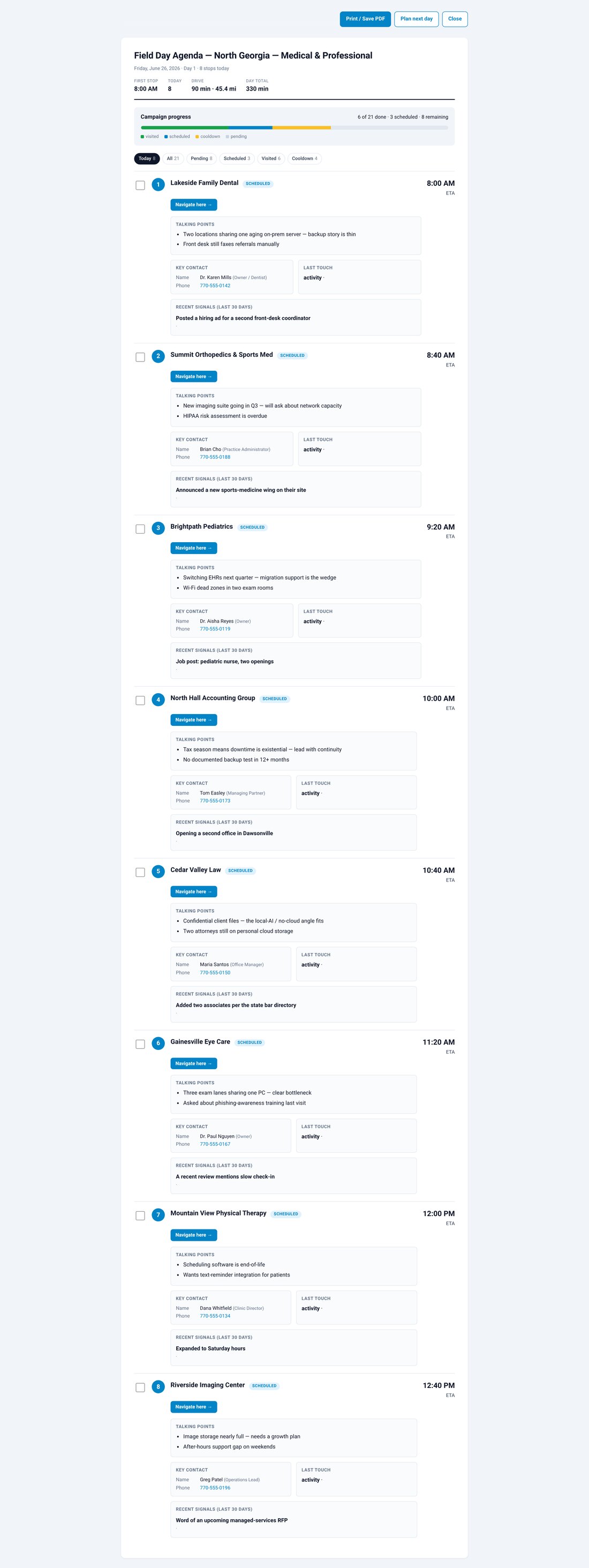
The agenda above is what the rep actually carries: each stop in visit order, with its brief right underneath — contact, last touch, talking points, recent signals — so the day is a sequence of informed conversations rather than a list of addresses.
Own your data, skip the per-seat fee
We built RouteHound on an open-source stack and run the whole thing on hardware we own. Road distances and drive times come from a self-hosted routing engine (OSRM); the stop ordering is handled by a travelling-salesman solver. That’s the same class of routing math behind the big commercial map apps — we gave up nothing on optimization quality. What we gained shows up in three ways any business will recognize:
- Your data stays yours. The prospect list, the visit history, the routes — none of it leaves systems you control to land on a vendor’s servers. If your prospect list includes regulated accounts — clinics, practices, anyone whose roster you’d never hand to a vendor — that alone justifies the build.
- The cost doesn’t scale against you. Per-seat field-sales route apps are commonly priced around $50–60 per user per month — a real, recurring tax on every rep, forever, that we sidestep entirely by owning the tool. (That figure is the public industry norm, not a quote and not a claim about our own savings — we’re not going to invent a number.)
- It bends to fit you. Because we own the code, RouteHound works the way our team works — the region-day model, the cooldown window, the brief format. A subscription makes you adopt its assumptions; this one adopts yours.
The human drives; the tool only plans
We’re deliberate about one thing: RouteHound proposes, a person disposes. It lays out the day on a map, but nothing happens until the rep looks at it and agrees — and the rep makes the visits, because the conversation, the judgment, and the relationship are the part no software should touch.
When a day is set, one click can write it back to the CRM: a scheduled-visit activity for each stop plus a day-summary note, so the visits show up on the calendar and the office and the field stay in sync without anyone double-entering anything. Two guardrails sit around that write, and we consider both non-negotiable. First, a dry-run preview shows you exactly what RouteHound would write — every activity, every note — before a single record is created, so nothing is a surprise. Second, every write is reversible: the tool keeps an audit log of what it recorded, and a day’s worth of entries can be undone cleanly if the plan changes. Test before you automate, and never write something into a business’s records that you can’t take back — that’s a standard we hold for any system that touches live data, not an afterthought bolted on here.
Built for the windshield
A plan you can’t use on the road isn’t a plan. RouteHound prints a clean day agenda — the stops in order with their briefs — for the rep who’d rather have paper on the passenger seat. And one tap opens the entire route in Google Maps, so turn-by-turn navigation for the whole loop is a single action, not eight addresses pasted in one at a time.
The same engine, pointed at other runs
We talk about RouteHound as a sales-route planner because that’s the problem we had. But strip off the label and what’s underneath is more general: an engine that takes a list of locations and a set of constraints — a workday, a starting point, who was visited recently — and produces a sensible, optimized plan a human can approve and act on. Point it at field-service technicians and it’s dispatch routing. Point it at deliveries and it’s a logistics planner. Point it at inspections, audits, or installs and it’s a way to cover a region without burning the day in the truck. Same pattern every time: pull the data you already have, do the optimization no human enjoys, prepare the person, and let them decide. That’s the kind of practical, owned-not-rented tooling that runs through everything we describe in what we build.
Will it work with your setup?
Two fair questions, answered plainly.
Your CRM. RouteHound talks to a CRM through a connector — it reads your prospects and their activity history and writes the scheduled visits back. Ours runs against the CRM we use; for your business we point that connector at whatever you already run — HubSpot, Salesforce, Zoho, a field-service platform like ServiceTitan, or something else. The region-day logic, the cooldown window, and the agenda don’t change — only the connector does. You don’t rip out your CRM; RouteHound plans on top of it.
Cost and standup. This isn’t a per-seat subscription that bills you forever for every rep on the road. It’s a tool we build and stand up for you, and then you own it — running on your own hardware, or hosted for you, your call. The model is deliberately the opposite of the software it replaces: pay to own the capability once instead of renting it per head, per month, indefinitely. What the build actually involves depends on your CRM and your territory — which is exactly the kind of thing worth a short, concrete conversation.
See what it could save your team
Remember the fifteen-minute tax from the top — the squint at the map, the day stitched together by hand before the first handshake. With RouteHound that morning becomes a center, a radius, and a click: the plan, the cooldown check, and the briefs are done before the coffee’s gone. We built it for our own outside-sales work, and that same fifteen minutes is leaking out of every field day at most companies that send people into a territory.
So the fastest way to judge it is on your own ground: tell us the CRM you run and the territory you cover, and we’ll map your first region-day — a real planned day on a real map, scored on your prospects instead of our screenshots. Prefer to start wider? Our free business IT assessment looks at where automation genuinely helps, where it has no business going, and what a sensible first step looks like for your team.
RouteHound: The Region-Day Route Planner We Built for Our Own Field Team
A self-hosted route planner that turns your CRM into focused, drivable region-days — own your data, skip the per-seat fee, keep every CRM write reversible.
Anyone whose job is visiting customers in person knows the small tax that gets paid before the first handshake of the day: figuring out where to go. You open the CRM, scroll a list of prospects scattered across a couple of counties, squint at a map, and try to stitch together a day that doesn’t have you crossing the same highway four times. It’s fifteen minutes of planning that rarely produces a good answer — and you pay it again every morning.
We had exactly this problem with our own outside-sales work, so we built a tool to fix it. We call it RouteHound. It pulls prospects out of our CRM, geocodes them, and plans a sane, drivable day of visits — and it runs entirely on our own hardware, so the prospect list and the routing never leave our network and there’s no per-seat subscription quietly billing us for every rep.
One honest note before we go further, because we’d rather under-claim than oversell: RouteHound’s routing is optimization, not an LLM. The part that orders your stops and measures drive time is math — open-source routing engines and a solver, the same class of technology behind the navigation app on your phone. There is AI in this story, but it lives somewhere specific — in the briefing that waits for the rep at each stop — and we’ll be precise about that when we get there.
This is what we mean when we call ourselves a Managed Intelligence Provider: practical automation that sits on top of dependable systems and hands a rep their morning back — the fifteen minutes that used to vanish into a map — without pretending every piece of it is magic. We built RouteHound for ourselves first — the only honest way to recommend a thing — and the same approach now works for any business that sends people into the field.
The defining idea: plan a region-day, not one perfect route
When most people first think about route optimization, the instinct is to ask for the optimal route — one mega-loop that touches every prospect in the database with the least possible driving. It sounds efficient. In practice it’s close to useless, because nobody visits two hundred prospects in a day. A single “optimal” route across your whole list mostly tells you that prospect 147 is theoretically three minutes closer if you hit it before prospect 148 — a decision no human needed help making.
Field reps don’t think in mega-routes. They think in days, and they think geographically: “I’m going to be up around Gainesville today — who else is up there worth a stop?” That’s the real planning unit, and it’s the one RouteHound is built around.
So instead of solving for one giant loop, RouteHound plans a region-day. You drop a center — a town, a ZIP code, a point on the map — and set a radius around it. The tool gathers every prospect inside that circle, then builds the best same-day loop through them, starting and ending at the office. Tomorrow you pick a different center, and over a week the whole territory gets covered in focused, geographically coherent days that barely overlap. Yes, planning one circle at a time instead of the whole map at once gives up a sliver of theoretical global-optimal mileage. What it buys back is worth far more: a day with less backtracking, a clear mental model of where you are, and — the part that actually matters — a plan a human will follow instead of override. The most optimal route in the world is worthless if the rep looks at it, decides it’s nonsense, and free-styles the day anyway.
The screen above is a real region-day: the office anchored at one point, the region center and its radius drawn on the map, and an eight-stop loop threaded through the prospects inside it, with the day’s total drive time and distance called out. It reads the way a rep already pictures their territory — one coherent chunk at a time.
A day only holds so many hours
This is where a map toy becomes an actual planning tool. A circle on a map might enclose forty prospects; a workday holds maybe eight hours. RouteHound knows the difference.
When it builds the loop it accounts for the real shape of a day — when you leave the office, when you want to be back, and how long a typical visit runs — and schedules only as many stops as genuinely fit once drive time and visit time are both counted. The prospects that don’t make today’s cut don’t vanish; they stay in the pool for the next time you plan that region. A single region becomes a rolling campaign: day one takes the densest, closest cluster, day two picks up where the hours ran out, and the territory gets worked down methodically instead of in an overlapping scramble.
Don’t waste a stop
Driving to a prospect is the expensive part of the job, so RouteHound works to make sure each stop earns the drive — in two ways.
First, a recency cooldown. Before it schedules anyone, it checks the CRM’s own activity history, and if a prospect was contacted or visited inside the last N days, it quietly holds them out of today’s route. Showing up at an account you talked to on Tuesday doesn’t help anyone; the tool simply waits until enough time has passed, so each day’s loop is fresh prospects rather than a re-run of last week.
Second, per-campaign progress tracking. For any territory you’re working, RouteHound keeps a running tally — visited, scheduled, on cooldown, and still pending — so you always know how much of the region is left and never lose the thread between days. It turns “I think I’ve mostly covered the north end” into an actual count.
Walk in informed, not cold
Every stop on the day’s agenda carries a short pre-visit brief: the key contact, the last time anyone touched the account, the talking points worth leading with, and any recent signals worth knowing before you walk in. The point is simple — the rep should arrive already up to speed instead of sizing up the room from scratch.
This is the one place AI does the work, and it’s worth being exact about it. The routing is math; the brief is where our AI prospect-intelligence system feeds in — the quiet desk research that, done by hand, would eat more time than the visit itself. That’s the diligent assistant that reads up on each account every morning and hands the rep a tidy summary before they leave: in effect, an AI virtual employee doing the prep nobody enjoys. That intelligence system is a whole story of its own, and a companion article covers it; here it’s enough to say the briefs are AI-written and the routing is not.
The agenda above is what the rep actually carries: each stop in visit order, with its brief right underneath — contact, last touch, talking points, recent signals — so the day is a sequence of informed conversations rather than a list of addresses.
Own your data, skip the per-seat fee
We built RouteHound on an open-source stack and run the whole thing on hardware we own. Road distances and drive times come from a self-hosted routing engine (OSRM); the stop ordering is handled by a travelling-salesman solver. That’s the same class of routing math behind the big commercial map apps — we gave up nothing on optimization quality. What we gained shows up in three ways any business will recognize:
- Your data stays yours. The prospect list, the visit history, the routes — none of it leaves systems you control to land on a vendor’s servers. If your prospect list includes regulated accounts — clinics, practices, anyone whose roster you’d never hand to a vendor — that alone justifies the build.
- The cost doesn’t scale against you. Per-seat field-sales route apps are commonly priced around $50–60 per user per month — a real, recurring tax on every rep, forever, that we sidestep entirely by owning the tool. (That figure is the public industry norm, not a quote and not a claim about our own savings — we’re not going to invent a number.)
- It bends to fit you. Because we own the code, RouteHound works the way our team works — the region-day model, the cooldown window, the brief format. A subscription makes you adopt its assumptions; this one adopts yours.
The human drives; the tool only plans
We’re deliberate about one thing: RouteHound proposes, a person disposes. It lays out the day on a map, but nothing happens until the rep looks at it and agrees — and the rep makes the visits, because the conversation, the judgment, and the relationship are the part no software should touch.
When a day is set, one click can write it back to the CRM: a scheduled-visit activity for each stop plus a day-summary note, so the visits show up on the calendar and the office and the field stay in sync without anyone double-entering anything. Two guardrails sit around that write, and we consider both non-negotiable. First, a dry-run preview shows you exactly what RouteHound would write — every activity, every note — before a single record is created, so nothing is a surprise. Second, every write is reversible: the tool keeps an audit log of what it recorded, and a day’s worth of entries can be undone cleanly if the plan changes. Test before you automate, and never write something into a business’s records that you can’t take back — that’s a standard we hold for any system that touches live data, not an afterthought bolted on here.
Built for the windshield
A plan you can’t use on the road isn’t a plan. RouteHound prints a clean day agenda — the stops in order with their briefs — for the rep who’d rather have paper on the passenger seat. And one tap opens the entire route in Google Maps, so turn-by-turn navigation for the whole loop is a single action, not eight addresses pasted in one at a time.
The same engine, pointed at other runs
We talk about RouteHound as a sales-route planner because that’s the problem we had. But strip off the label and what’s underneath is more general: an engine that takes a list of locations and a set of constraints — a workday, a starting point, who was visited recently — and produces a sensible, optimized plan a human can approve and act on. Point it at field-service technicians and it’s dispatch routing. Point it at deliveries and it’s a logistics planner. Point it at inspections, audits, or installs and it’s a way to cover a region without burning the day in the truck. Same pattern every time: pull the data you already have, do the optimization no human enjoys, prepare the person, and let them decide. That’s the kind of practical, owned-not-rented tooling that runs through everything we describe in what we build.
Will it work with your setup?
Two fair questions, answered plainly.
Your CRM. RouteHound talks to a CRM through a connector — it reads your prospects and their activity history and writes the scheduled visits back. Ours runs against the CRM we use; for your business we point that connector at whatever you already run — HubSpot, Salesforce, Zoho, a field-service platform like ServiceTitan, or something else. The region-day logic, the cooldown window, and the agenda don’t change — only the connector does. You don’t rip out your CRM; RouteHound plans on top of it.
Cost and standup. This isn’t a per-seat subscription that bills you forever for every rep on the road. It’s a tool we build and stand up for you, and then you own it — running on your own hardware, or hosted for you, your call. The model is deliberately the opposite of the software it replaces: pay to own the capability once instead of renting it per head, per month, indefinitely. What the build actually involves depends on your CRM and your territory — which is exactly the kind of thing worth a short, concrete conversation.
See what it could save your team
Remember the fifteen-minute tax from the top — the squint at the map, the day stitched together by hand before the first handshake. With RouteHound that morning becomes a center, a radius, and a click: the plan, the cooldown check, and the briefs are done before the coffee’s gone. We built it for our own outside-sales work, and that same fifteen minutes is leaking out of every field day at most companies that send people into a territory.
So the fastest way to judge it is on your own ground: tell us the CRM you run and the territory you cover, and we’ll map your first region-day — a real planned day on a real map, scored on your prospects instead of our screenshots. Prefer to start wider? Our free business IT assessment looks at where automation genuinely helps, where it has no business going, and what a sensible first step looks like for your team.