
When MFA Isn't Enough: The New Microsoft 365 Account-Takeover Attack You Need to Know About
A new attack technique called EvilTokens has compromised hundreds of Microsoft 365 accounts since February 2026, and the victims all had multi-factor authentication enabled. Here's what device-code phishing is, why it defeats traditional security training, and the specific controls that stop it.

If your team relies on Microsoft 365, and almost every business does, there’s a new attack technique you should know about. It’s called device-code phishing, and it has compromised more than 340 organizations across the United States, Canada, Australia, New Zealand, and Germany since February 2026. Microsoft is now observing 10 to 15 distinct phishing campaigns launched every single day.
Here’s what makes it different from anything you’ve seen before: the people who fell for it had multi-factor authentication enabled. They completed it correctly. They were compromised anyway.
This article explains how the attack works in plain language, why most existing defenses don’t catch it, and the specific controls that do, controls that are already included with most Microsoft 365 licensing and just need to be turned on.
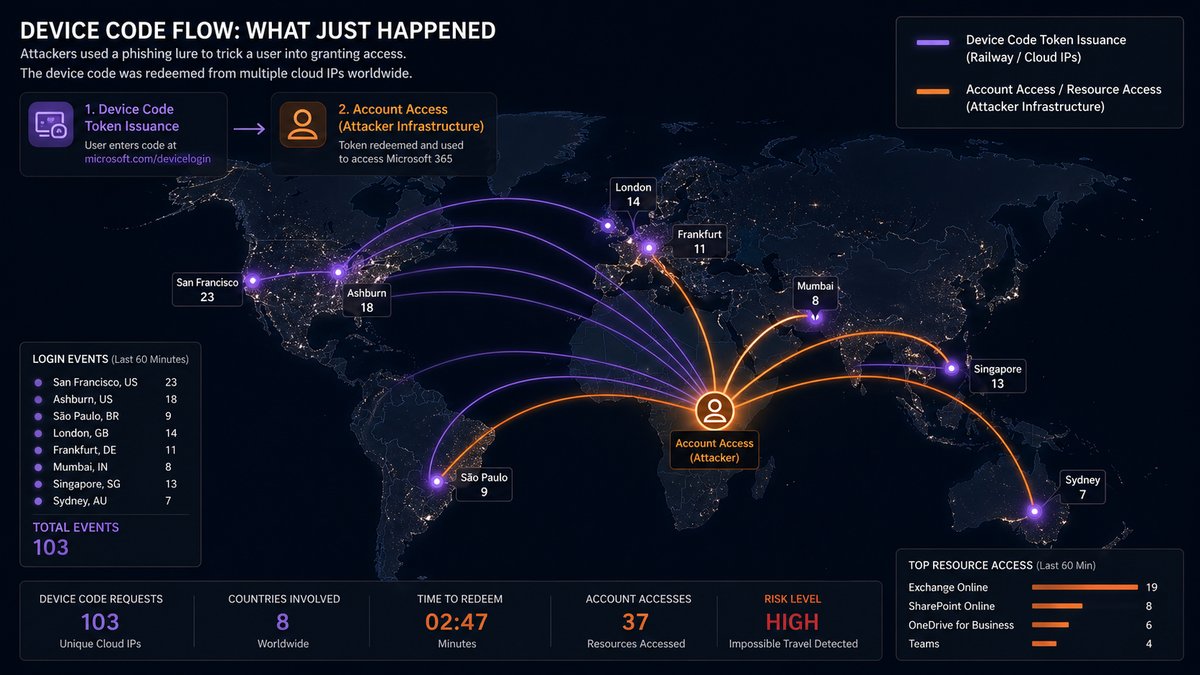
How the Attack Works, in Plain English
Microsoft 365 has a sign-in feature originally designed for devices that don’t have a keyboard, things like smart TVs, conference room hardware, and certain printers. The way it works is straightforward: the device shows a short code on its screen, and you go to a Microsoft web page and enter that code to grant the device access to your account.
It’s a legitimate, useful Microsoft feature. Attackers have figured out how to weaponize it.
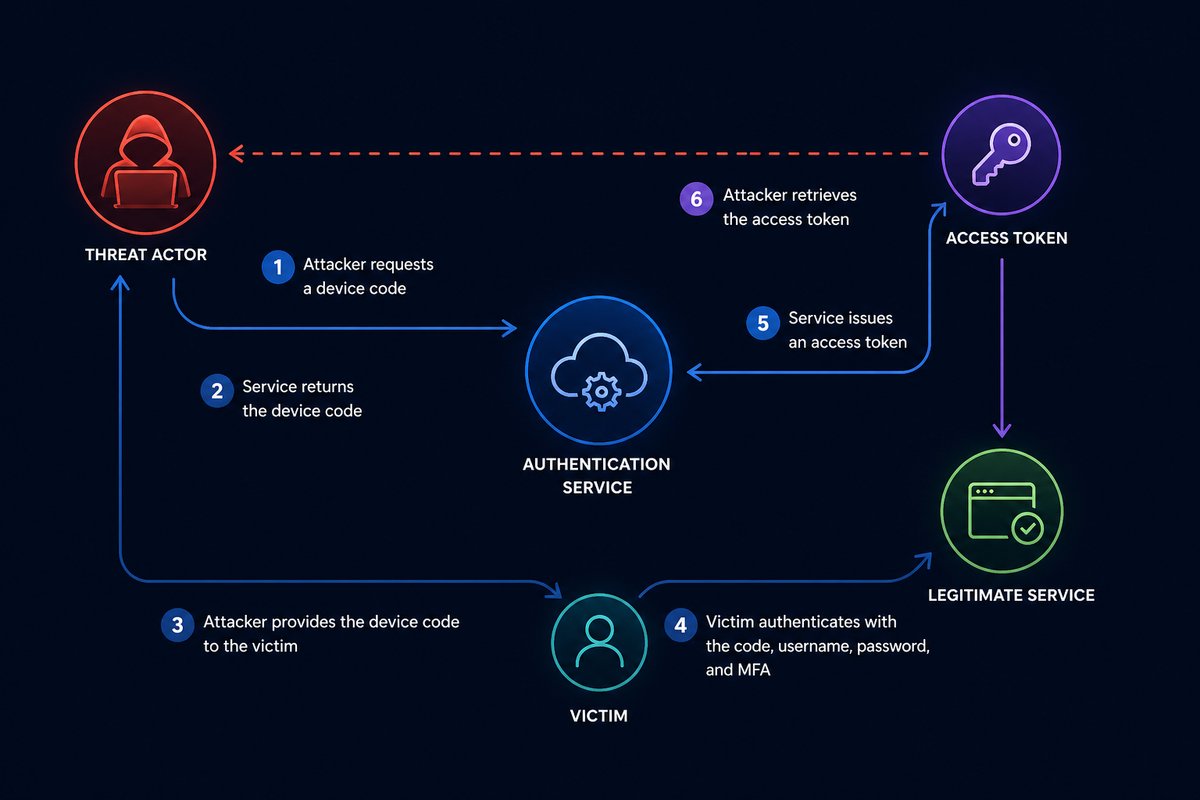
The attack chain looks like this:
- You receive an email that looks like a shared SharePoint document, an invoice, a voicemail notification, or a request for proposal. It’s well-written and addressed to you by name. It came through a legitimate-looking link rewriter, so your spam filter passed it through.
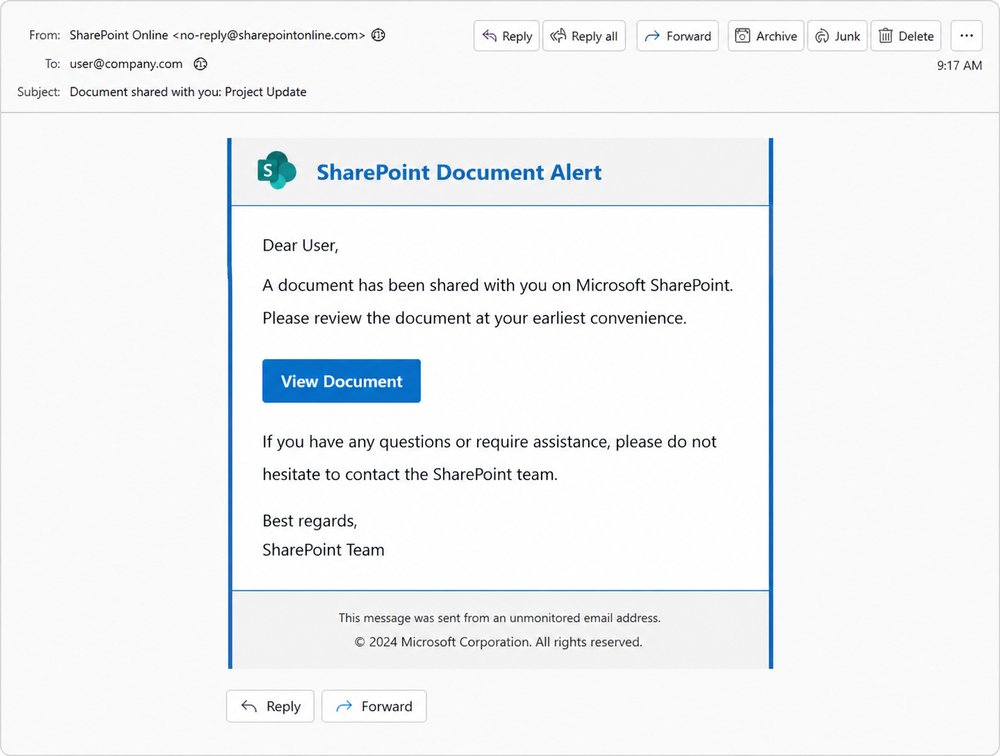
-
You click the link. It takes you through a short series of redirects to a page that says something like “Your secure document is ready, sign in with Microsoft to view it.” The page tells you it has copied a sign-in code to your clipboard for convenience.
-
You click “Continue,” which sends you to the real Microsoft sign-in page at
microsoft.com/devicelogin. Genuine Microsoft URL. Genuine Microsoft logo. Genuine Microsoft TLS certificate. Everything looks correct because it is correct.
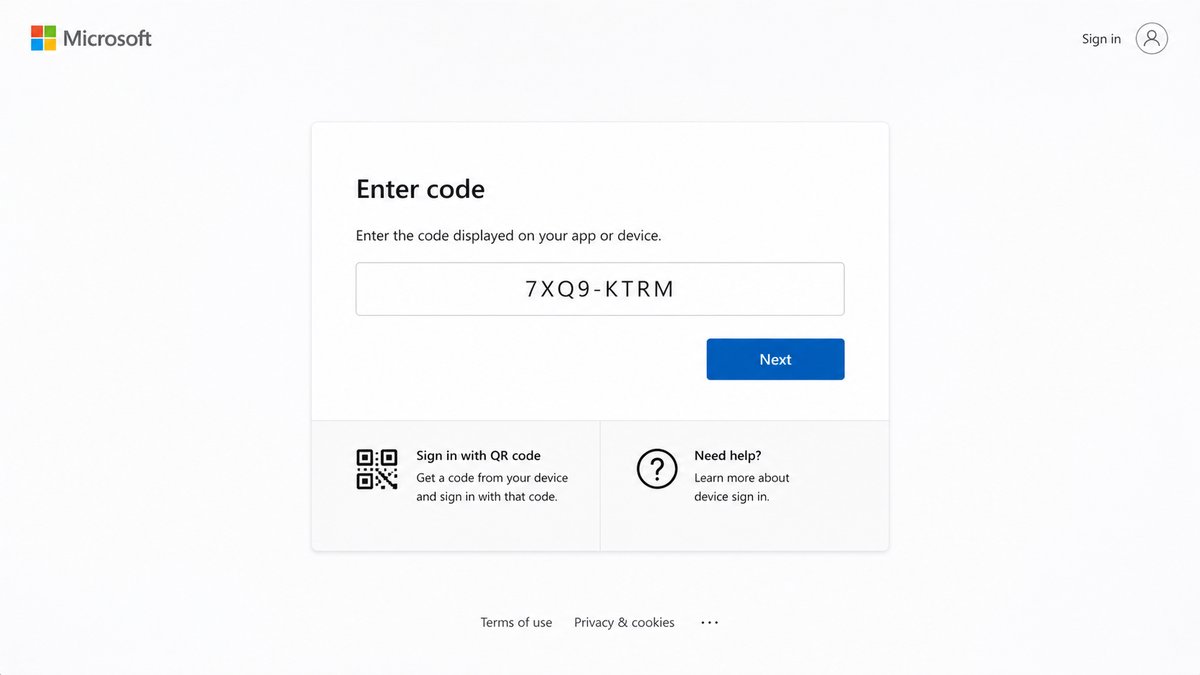
- You sign in. Your password works. Your password manager autofills (because it’s the real Microsoft site). Your MFA prompt comes through on your phone, number-matching, the kind you trust. You approve it.
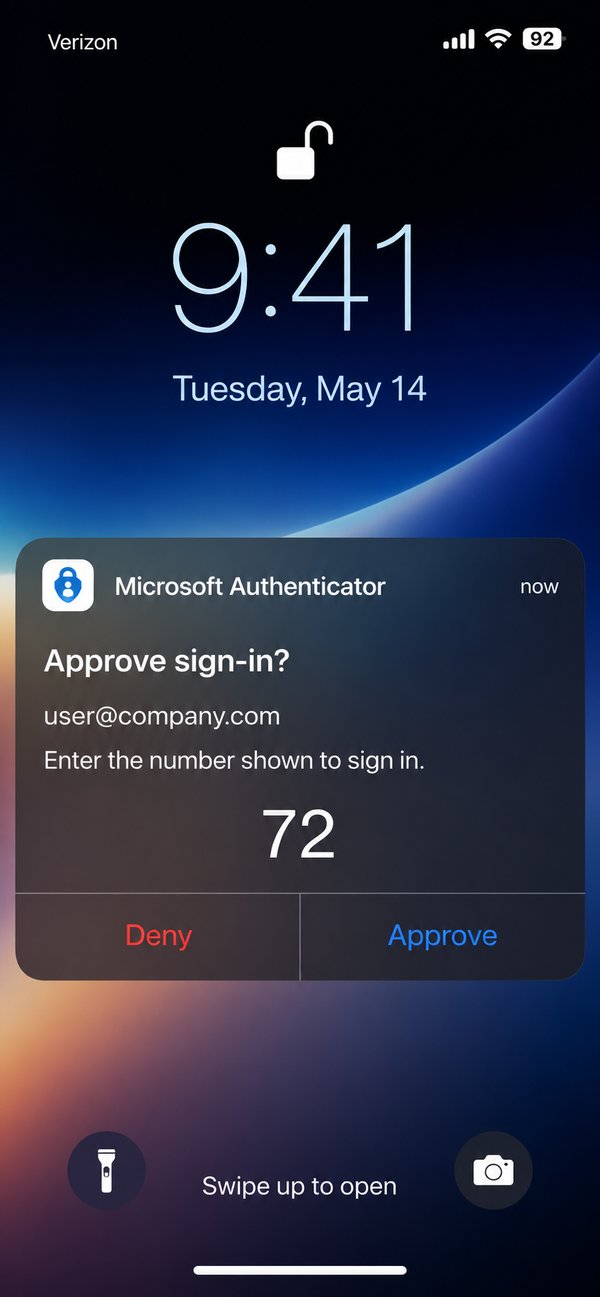
- Microsoft says “You’re signed in. You can close this window.” And it’s true. You authenticated successfully.
Behind the scenes, an attacker just received a valid session for your account. That session can remain active for up to 90 days. They can read your email, set up hidden forwarding rules to intercept future messages, and start preparing wire-fraud or invoice-redirection scams using your real account.
The document never opens. You shrug, close the page, and move on. Nothing seems wrong because, from your perspective, nothing was.
Why Traditional Anti-Phishing Advice Doesn’t Help Here
Most cybersecurity training teaches users to spot specific warning signs. Almost every one of them fails for this attack:
| What we’ve all been taught | Why it doesn’t catch this attack |
|---|---|
| ”Check the URL before signing in” | The URL is genuine Microsoft |
| ”Look for the green padlock” | The certificate is genuine Microsoft |
| ”Don’t enter your password on suspicious sites” | You’re entering it on Microsoft itself |
| ”Watch out for fake MFA prompts” | The MFA prompt is real, sent by Microsoft |
| ”Use a password manager, it won’t autofill on fake sites” | The password manager autofills correctly because the site is real |
| ”Watch for typos and bad grammar” | The lures are written by AI and read flawlessly |
This isn’t a failure of awareness. It’s a structurally different kind of attack, one designed specifically to defeat the warnings users have been trained to look for. It’s a stark reminder that employees can unknowingly put your business’s data at risk even when they’re following every best practice they’ve been taught.
How Likely Is It to Affect Your Business?
Cybercriminals have packaged this attack into a service that’s sold to less-technical operators on private channels, the same way mass-market phishing has worked for years. The criminals don’t have to be sophisticated; they rent the tooling and pay-per-use.
In a single four-week window in early 2026, security researchers measured more than 7 million of these attacks. The kit operators have over 1,000 phishing domains in active rotation. Lures are personalized using artificial intelligence based on publicly available information, your LinkedIn profile, your company website, your industry, to create messages that feel relevant and urgent.
Small and mid-sized businesses are not too small to be targeted. The attackers don’t pre-screen victims; they cast a wide net and follow up on whoever takes the bait. The end goal is usually wire fraud or vendor-payment redirection, both of which can hit a business of any size hard, often for six-figure losses before anyone notices the breach.
What You Can Do Today
This is the most important section of the article. The good news is that this attack has a clear, documented set of countermeasures, and most of them are already included in the Microsoft 365 licensing you’re paying for. They just need to be configured.
For everyone, the one rule that keeps you safe
Never enter a Microsoft sign-in code that arrived by email, chat, or text.
A legitimate Microsoft sign-in code only ever appears on the device you are physically setting up, a conference room TV, a printer, a smart display. It never travels through email. If you weren’t standing in front of a piece of hardware that just showed you a code, do not enter the code anywhere, even on a real Microsoft page.
This single rule defeats the entire attack. It’s worth memorizing, sharing with your team, and putting in your security awareness training.
For your IT team, the policy that blocks it entirely
Microsoft Entra (formerly Azure Active Directory) supports a feature called Conditional Access. One Conditional Access policy makes this attack technically impossible to complete:
Block authentication transfer by device code flow, a Conditional Access policy that targets
authenticationFlows.transferMethods = deviceCodeFlowand blocks it for all users by default, with documented exceptions for the small number of devices (conference room systems, certain printers) that legitimately need it.
Microsoft published official guidance on this policy in early 2026. It’s available with Microsoft Entra ID P1, which is included in Microsoft 365 Business Premium and most enterprise plans. Once enforced, the attack cannot complete, even if a user falls for the lure and enters the code.
If your business uses Microsoft 365, the question to ask your IT lead is simple: “Do we have a Conditional Access policy that blocks device code flow, and which accounts are exempt?” Either they have it, or they don’t, and the answer takes about five minutes to verify.
For incident response, what to check if you’re worried
If you suspect you may have entered a code from an email at any point in the last 90 days, the things worth checking are:
- Active sessions and devices on your account. In Microsoft 365, you can see every device currently signed in to your account at
mysignins.microsoft.com. Anything you don’t recognize should be revoked immediately. - Inbox rules. Attackers commonly create hidden rules that auto-forward or delete certain incoming messages, for example, anything containing the word “invoice” or “wire transfer.” Check Outlook → Settings → Rules and remove anything you didn’t create.
- Mail forwarding. Check whether server-side forwarding has been enabled to an external address you don’t recognize.
- OAuth app consents. Attackers sometimes register a malicious app to maintain access. Review app permissions in My Apps and revoke anything unfamiliar.
If you find any of those, change your password, revoke all sessions, and tell your IT team or managed-services provider immediately. The first hour matters far more than the first day.
Speed matters more than perfection
You will not get in trouble for reporting a suspicious email that turns out to be benign. You will create a serious problem if you complete a sign-in flow you weren’t expecting and don’t tell anyone. The difference between reporting a compromise in five minutes versus five hours can be the difference between one compromised user and a company-wide breach.
A Note on Defense in Depth
No single control catches every variant of this attack. The Conditional Access policy described above stops the device-code flow specifically, but a determined attacker has other techniques in the same family, token replay, OAuth consent phishing, AiTM (adversary-in-the-middle) proxies. The complete defense is layered: Conditional Access prevents the attack at the policy level, identity-threat detection catches token misuse after the fact, endpoint protection detects post-compromise behavior, and a documented incident-response procedure shortens the window of damage if something does get through. We’ve written more broadly on this approach in a layered cyber defense that works for small business.
Further Reading
For technical readers who want to dig deeper into the research behind this attack:
- Microsoft Security Blog: Inside an AI-enabled device code phishing campaign (April 2026)
- Huntress: EvilTokens, Big Cybercrime’s AI Platform Built to Bypass Your MFA
- Sekoia: EvilTokens kit: device code phishing as-a-service
- Barracuda Networks: Threat Spotlight, 7 million device code phishing attacks in 4 weeks
Southeastern Technical is a managed IT and cybersecurity provider serving businesses across the Southeast. If you’d like a second set of eyes on your Microsoft 365 configuration, whether you’re a customer of ours or not, we’re happy to take a look and tell you honestly what’s in place and what isn’t.
Frequently asked questions
What is device-code phishing (the EvilTokens attack)?
Device-code phishing weaponizes a legitimate Microsoft 365 sign-in feature built for keyboard-less devices like smart TVs and printers. You are tricked into entering an attacker's sign-in code on the real Microsoft page, which hands the attacker a valid session for your account. It has compromised more than 340 organizations since February 2026, and the victims all had MFA enabled.
Why doesn't multi-factor authentication stop this attack?
Because you complete a genuine Microsoft sign-in on the real microsoft.com/devicelogin page, your password, your password manager autofill, and your real MFA prompt all work correctly. You authenticate successfully, but you are approving access for the attacker's device. The attacker then holds a valid session that can stay active for up to 90 days.
What is the single rule that stops device-code phishing?
Never enter a Microsoft sign-in code that arrived by email, chat, or text. A legitimate Microsoft code only ever appears on a physical device you are setting up, such as a conference room TV or printer. If you were not standing in front of hardware that showed you a code, do not enter it anywhere, even on a real Microsoft page.
How can an IT team block device-code phishing entirely?
Microsoft Entra Conditional Access can block authentication transfer by device code flow for all users by default, with documented exceptions for the few devices that legitimately need it. It is included with Microsoft Entra ID P1, part of Microsoft 365 Business Premium and most enterprise plans. Once enforced, the attack cannot complete even if a user enters the code. Ask your IT lead whether that policy is in place and which accounts are exempt.
When MFA Isn't Enough: The New Microsoft 365 Account-Takeover Attack You Need to Know About
A new attack technique called EvilTokens has compromised hundreds of Microsoft 365 accounts since February 2026, and the victims all had multi-factor authentication enabled. Here's what device-code phishing is, why it defeats traditional security training, and the specific controls that stop it.
If your team relies on Microsoft 365, and almost every business does, there’s a new attack technique you should know about. It’s called device-code phishing, and it has compromised more than 340 organizations across the United States, Canada, Australia, New Zealand, and Germany since February 2026. Microsoft is now observing 10 to 15 distinct phishing campaigns launched every single day.
Here’s what makes it different from anything you’ve seen before: the people who fell for it had multi-factor authentication enabled. They completed it correctly. They were compromised anyway.
This article explains how the attack works in plain language, why most existing defenses don’t catch it, and the specific controls that do, controls that are already included with most Microsoft 365 licensing and just need to be turned on.
How the Attack Works, in Plain English
Microsoft 365 has a sign-in feature originally designed for devices that don’t have a keyboard, things like smart TVs, conference room hardware, and certain printers. The way it works is straightforward: the device shows a short code on its screen, and you go to a Microsoft web page and enter that code to grant the device access to your account.
It’s a legitimate, useful Microsoft feature. Attackers have figured out how to weaponize it.
The attack chain looks like this:
- You receive an email that looks like a shared SharePoint document, an invoice, a voicemail notification, or a request for proposal. It’s well-written and addressed to you by name. It came through a legitimate-looking link rewriter, so your spam filter passed it through.
-
You click the link. It takes you through a short series of redirects to a page that says something like “Your secure document is ready, sign in with Microsoft to view it.” The page tells you it has copied a sign-in code to your clipboard for convenience.
-
You click “Continue,” which sends you to the real Microsoft sign-in page at
microsoft.com/devicelogin. Genuine Microsoft URL. Genuine Microsoft logo. Genuine Microsoft TLS certificate. Everything looks correct because it is correct.
- You sign in. Your password works. Your password manager autofills (because it’s the real Microsoft site). Your MFA prompt comes through on your phone, number-matching, the kind you trust. You approve it.
- Microsoft says “You’re signed in. You can close this window.” And it’s true. You authenticated successfully.
Behind the scenes, an attacker just received a valid session for your account. That session can remain active for up to 90 days. They can read your email, set up hidden forwarding rules to intercept future messages, and start preparing wire-fraud or invoice-redirection scams using your real account.
The document never opens. You shrug, close the page, and move on. Nothing seems wrong because, from your perspective, nothing was.
Why Traditional Anti-Phishing Advice Doesn’t Help Here
Most cybersecurity training teaches users to spot specific warning signs. Almost every one of them fails for this attack:
| What we’ve all been taught | Why it doesn’t catch this attack |
|---|---|
| ”Check the URL before signing in” | The URL is genuine Microsoft |
| ”Look for the green padlock” | The certificate is genuine Microsoft |
| ”Don’t enter your password on suspicious sites” | You’re entering it on Microsoft itself |
| ”Watch out for fake MFA prompts” | The MFA prompt is real, sent by Microsoft |
| ”Use a password manager, it won’t autofill on fake sites” | The password manager autofills correctly because the site is real |
| ”Watch for typos and bad grammar” | The lures are written by AI and read flawlessly |
This isn’t a failure of awareness. It’s a structurally different kind of attack, one designed specifically to defeat the warnings users have been trained to look for. It’s a stark reminder that employees can unknowingly put your business’s data at risk even when they’re following every best practice they’ve been taught.
How Likely Is It to Affect Your Business?
Cybercriminals have packaged this attack into a service that’s sold to less-technical operators on private channels, the same way mass-market phishing has worked for years. The criminals don’t have to be sophisticated; they rent the tooling and pay-per-use.
In a single four-week window in early 2026, security researchers measured more than 7 million of these attacks. The kit operators have over 1,000 phishing domains in active rotation. Lures are personalized using artificial intelligence based on publicly available information, your LinkedIn profile, your company website, your industry, to create messages that feel relevant and urgent.
Small and mid-sized businesses are not too small to be targeted. The attackers don’t pre-screen victims; they cast a wide net and follow up on whoever takes the bait. The end goal is usually wire fraud or vendor-payment redirection, both of which can hit a business of any size hard, often for six-figure losses before anyone notices the breach.
What You Can Do Today
This is the most important section of the article. The good news is that this attack has a clear, documented set of countermeasures, and most of them are already included in the Microsoft 365 licensing you’re paying for. They just need to be configured.
For everyone, the one rule that keeps you safe
Never enter a Microsoft sign-in code that arrived by email, chat, or text.
A legitimate Microsoft sign-in code only ever appears on the device you are physically setting up, a conference room TV, a printer, a smart display. It never travels through email. If you weren’t standing in front of a piece of hardware that just showed you a code, do not enter the code anywhere, even on a real Microsoft page.
This single rule defeats the entire attack. It’s worth memorizing, sharing with your team, and putting in your security awareness training.
For your IT team, the policy that blocks it entirely
Microsoft Entra (formerly Azure Active Directory) supports a feature called Conditional Access. One Conditional Access policy makes this attack technically impossible to complete:
Block authentication transfer by device code flow, a Conditional Access policy that targets
authenticationFlows.transferMethods = deviceCodeFlowand blocks it for all users by default, with documented exceptions for the small number of devices (conference room systems, certain printers) that legitimately need it.
Microsoft published official guidance on this policy in early 2026. It’s available with Microsoft Entra ID P1, which is included in Microsoft 365 Business Premium and most enterprise plans. Once enforced, the attack cannot complete, even if a user falls for the lure and enters the code.
If your business uses Microsoft 365, the question to ask your IT lead is simple: “Do we have a Conditional Access policy that blocks device code flow, and which accounts are exempt?” Either they have it, or they don’t, and the answer takes about five minutes to verify.
For incident response, what to check if you’re worried
If you suspect you may have entered a code from an email at any point in the last 90 days, the things worth checking are:
- Active sessions and devices on your account. In Microsoft 365, you can see every device currently signed in to your account at
mysignins.microsoft.com. Anything you don’t recognize should be revoked immediately. - Inbox rules. Attackers commonly create hidden rules that auto-forward or delete certain incoming messages, for example, anything containing the word “invoice” or “wire transfer.” Check Outlook → Settings → Rules and remove anything you didn’t create.
- Mail forwarding. Check whether server-side forwarding has been enabled to an external address you don’t recognize.
- OAuth app consents. Attackers sometimes register a malicious app to maintain access. Review app permissions in My Apps and revoke anything unfamiliar.
If you find any of those, change your password, revoke all sessions, and tell your IT team or managed-services provider immediately. The first hour matters far more than the first day.
Speed matters more than perfection
You will not get in trouble for reporting a suspicious email that turns out to be benign. You will create a serious problem if you complete a sign-in flow you weren’t expecting and don’t tell anyone. The difference between reporting a compromise in five minutes versus five hours can be the difference between one compromised user and a company-wide breach.
A Note on Defense in Depth
No single control catches every variant of this attack. The Conditional Access policy described above stops the device-code flow specifically, but a determined attacker has other techniques in the same family, token replay, OAuth consent phishing, AiTM (adversary-in-the-middle) proxies. The complete defense is layered: Conditional Access prevents the attack at the policy level, identity-threat detection catches token misuse after the fact, endpoint protection detects post-compromise behavior, and a documented incident-response procedure shortens the window of damage if something does get through. We’ve written more broadly on this approach in a layered cyber defense that works for small business.
Further Reading
For technical readers who want to dig deeper into the research behind this attack:
- Microsoft Security Blog: Inside an AI-enabled device code phishing campaign (April 2026)
- Huntress: EvilTokens, Big Cybercrime’s AI Platform Built to Bypass Your MFA
- Sekoia: EvilTokens kit: device code phishing as-a-service
- Barracuda Networks: Threat Spotlight, 7 million device code phishing attacks in 4 weeks
Southeastern Technical is a managed IT and cybersecurity provider serving businesses across the Southeast. If you’d like a second set of eyes on your Microsoft 365 configuration, whether you’re a customer of ours or not, we’re happy to take a look and tell you honestly what’s in place and what isn’t.
Frequently asked questions
What is device-code phishing (the EvilTokens attack)?
Device-code phishing weaponizes a legitimate Microsoft 365 sign-in feature built for keyboard-less devices like smart TVs and printers. You are tricked into entering an attacker's sign-in code on the real Microsoft page, which hands the attacker a valid session for your account. It has compromised more than 340 organizations since February 2026, and the victims all had MFA enabled.
Why doesn't multi-factor authentication stop this attack?
Because you complete a genuine Microsoft sign-in on the real microsoft.com/devicelogin page, your password, your password manager autofill, and your real MFA prompt all work correctly. You authenticate successfully, but you are approving access for the attacker's device. The attacker then holds a valid session that can stay active for up to 90 days.
What is the single rule that stops device-code phishing?
Never enter a Microsoft sign-in code that arrived by email, chat, or text. A legitimate Microsoft code only ever appears on a physical device you are setting up, such as a conference room TV or printer. If you were not standing in front of hardware that showed you a code, do not enter it anywhere, even on a real Microsoft page.
How can an IT team block device-code phishing entirely?
Microsoft Entra Conditional Access can block authentication transfer by device code flow for all users by default, with documented exceptions for the few devices that legitimately need it. It is included with Microsoft Entra ID P1, part of Microsoft 365 Business Premium and most enterprise plans. Once enforced, the attack cannot complete even if a user enters the code. Ask your IT lead whether that policy is in place and which accounts are exempt.